



Introduction
Smartphones have become an essential part of daily life. We use them to communicate, shop online, manage finances, store photos, access social media, and even work remotely. As a result, mobile devices contain a large amount of personal and sensitive information. While smartphones offer convenience, they also create opportunities for cybercriminals to steal valuable data.
Understanding the Best Ways to Keep Your Mobile Data Safe is no longer optional. Whether you use an Android device or an iPhone, protecting your information should be a top priority. Data breaches, phishing scams, malware attacks, and identity theft are becoming increasingly common. Many users unknowingly expose their information through weak passwords, unsecured networks, or unsafe downloads.
The good news is that mobile security does not have to be complicated. By following a few practical habits and security measures, you can significantly reduce the risk of losing important data. From creating strong passwords to avoiding suspicious links, small actions can make a major difference.
This guide explains the Best Ways to Keep Your Mobile Data Safe in a simple and easy-to-understand manner. Whether you are a beginner or an intermediate smartphone user, these tips will help you strengthen your mobile security and protect your personal information from potential threats.
What is Mobile Data Security?
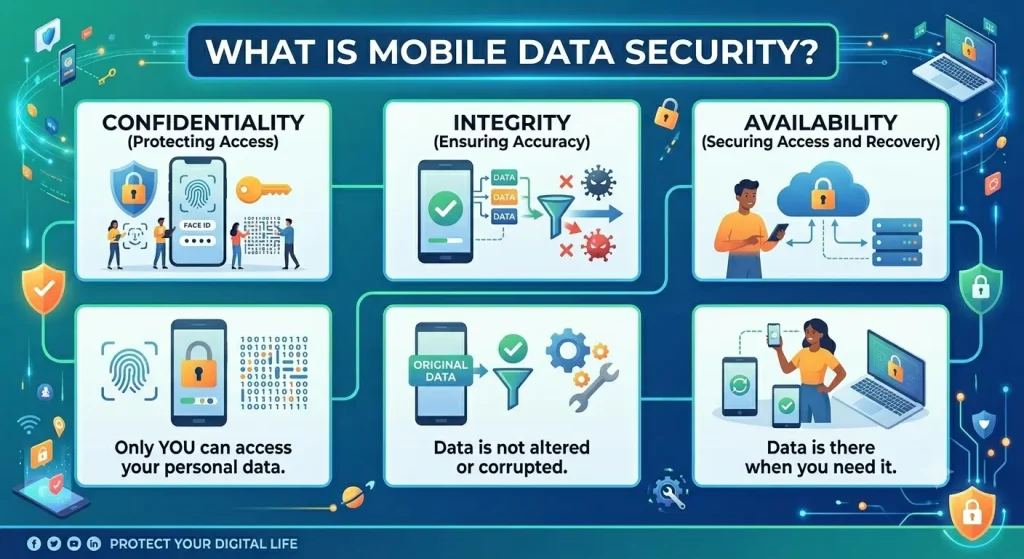
Mobile data security refers to the practices, tools, and strategies used to protect information stored on smartphones and tablets from unauthorized access, theft, corruption, or misuse.
This information may include:
- Personal photos and videos
- Contact lists
- Banking information
- Passwords
- Emails
- Messages
- Work-related documents
- Social media accounts
Mobile data security combines both technology and user behavior. Security features such as encryption, biometric authentication, antivirus software, and regular updates help protect devices. At the same time, users must make smart decisions about downloads, passwords, and internet usage.
The primary goal is to ensure that sensitive information remains private, secure, and accessible only to authorized individuals.
Why is Mobile Data Security Important?

Modern smartphones store more personal information than ever before. Losing access to this data or having it stolen can result in serious consequences.
Mobile data security is important because it helps:
- Prevent identity theft
- Protect financial information
- Safeguard personal memories and photos
- Secure business and work-related files
- Reduce the risk of cyberattacks
- Protect online accounts from unauthorized access
- Maintain privacy and confidentiality
Without proper security measures, attackers may gain access to your personal information and use it for fraudulent activities.
Detailed Step-by-Step Guide
1. Use Strong and Unique Passwords
One of the Best Ways to Keep Your Mobile Data Safe is using strong passwords.
A secure password should:
- Be at least 12 characters long
- Include uppercase and lowercase letters
- Contain numbers
- Include special symbols
- Avoid personal information
Example:
Strong Password: T9#Sunrise!84Wave
Weak Password: 123456
Avoid using the same password for multiple accounts because a single breach can compromise several services.
2. Enable Biometric Authentication
Modern smartphones offer biometric security options such as:
- Fingerprint recognition
- Face recognition
- Iris scanning
Biometric authentication adds an extra layer of security and makes unauthorized access more difficult.
3. Turn On Two-Factor Authentication
Two-factor authentication (2FA) requires users to provide a second verification step when logging in.
Common methods include:
- SMS codes
- Authentication apps
- Security keys
Even if someone obtains your password, they may still be unable to access your account without the second verification factor.
4. Keep Your Operating System Updated
Software updates often contain security patches that fix vulnerabilities discovered by developers.
Benefits of updates include:
- Improved security
- Better performance
- Bug fixes
- Protection against newly discovered threats
Enable automatic updates whenever possible.
5. Install Apps Only from Trusted Sources
Downloading applications from unofficial sources can expose your device to malware and spyware.
Follow these guidelines:
- Use official app stores
- Check developer information
- Read reviews
- Verify permissions before installation
If an app requests unnecessary permissions, consider avoiding it.
6. Be Careful with Public Wi-Fi
Public Wi-Fi networks are convenient but can be risky.
Cybercriminals may intercept information transmitted through unsecured networks.
To stay safe:
- Avoid online banking on public Wi-Fi
- Use a VPN
- Disable automatic Wi-Fi connections
- Verify network names before connecting
These precautions represent some of the Best Ways to Keep Your Mobile Data Safe while traveling or working remotely.
7. Use a Reliable VPN
A Virtual Private Network encrypts internet traffic and helps protect your online activity.
Advantages include:
- Improved privacy
- Secure browsing
- Protection on public networks
- Reduced tracking
VPNs are particularly useful when accessing sensitive information outside your home network.
8. Back Up Your Data Regularly
Data backups ensure that important information can be recovered if your device is lost, stolen, or damaged.
Consider backing up:
- Photos
- Videos
- Documents
- Contacts
- Messages
Schedule automatic backups whenever available.
9. Watch Out for Phishing Attacks
Phishing attacks trick users into revealing sensitive information.
Warning signs include:
- Urgent messages
- Suspicious links
- Requests for passwords
- Unusual sender addresses
Always verify the source before clicking links or sharing personal information.
10. Lock Your Device Immediately
Never leave your smartphone unlocked.
Configure automatic screen locking after a short period of inactivity.
Recommended options:
- PIN code
- Password
- Fingerprint lock
- Face recognition
11. Review App Permissions
Many applications request access to information they do not actually need.
Regularly check permissions for:
- Camera
- Microphone
- Location
- Contacts
- Storage
Disable unnecessary permissions to reduce privacy risks.
12. Use Mobile Security Software
Security applications can provide additional protection through:
- Malware scanning
- Real-time monitoring
- Privacy alerts
- Anti-theft features
Choose reputable security solutions with positive reviews and regular updates.
13. Encrypt Your Device
Encryption converts readable information into coded data that cannot be easily accessed without authorization.
Many modern smartphones offer built-in encryption features.
Benefits include:
- Better privacy
- Stronger protection against theft
- Improved data security
14. Avoid Clicking Unknown Links
Unexpected messages often contain malicious links designed to steal information.
Before clicking:
- Check the sender
- Inspect the URL
- Verify authenticity
- Avoid shortened links from unknown sources
15. Enable Find My Device Features
Most smartphones include tracking features that help locate lost devices.
These tools may allow you to:
- Locate the device
- Lock it remotely
- Display a message
- Erase data remotely
This is among the Best Ways to Keep Your Mobile Data Safe if your phone is misplaced or stolen.
Benefits of Mobile Data Security
Implementing proper security measures offers numerous advantages:
- Protects personal information
- Reduces identity theft risks
- Prevents unauthorized account access
- Safeguards financial data
- Improves online privacy
- Secures photos and documents
- Enhances confidence when browsing
- Protects business information
- Reduces malware infections
- Minimizes recovery costs after security incidents
The Best Ways to Keep Your Mobile Data Safe help users maintain control over their digital lives.
Disadvantages / Risks
Although security measures are beneficial, some challenges may exist:
- Strong passwords can be difficult to remember
- Two-factor authentication may add login steps
- VPN services may slightly reduce connection speed
- Security software can consume device resources
- Frequent updates may require storage space
- Backup services may involve subscription costs
Despite these minor inconveniences, the benefits greatly outweigh the drawbacks.
Common Mistakes to Avoid
Many users unintentionally weaken their mobile security.
Avoid these common mistakes:
Using Weak Passwords
Simple passwords are easy for attackers to guess.
Ignoring Software Updates
Delaying updates leaves devices vulnerable to known security flaws.
Downloading Unknown Applications
Unverified apps can contain harmful software.
Sharing Personal Information Publicly
Oversharing on social media can increase security risks.
Connecting to Unsecured Wi-Fi
Open networks can expose sensitive information.
Disabling Security Features
Turning off security settings for convenience can create vulnerabilities.
Not Backing Up Data
Without backups, recovering important information can be difficult.
Clicking Suspicious Links
Many cyberattacks begin with a deceptive message or email.
What is the safest way to protect mobile data?
Using strong passwords, enabling two-factor authentication, updating software regularly, and avoiding suspicious links are among the safest methods.
Can public Wi-Fi steal my information?
Public Wi-Fi itself does not steal information, but attackers may exploit unsecured networks to intercept data. Using a VPN can improve protection.
Is antivirus software necessary for smartphones?
While not always required, reputable mobile security software can provide additional protection against malware and other threats.
How often should I back up my phone?
Regular backups are recommended. Automatic daily or weekly backups provide the best protection against data loss.
What should I do if my phone is stolen?
Use device tracking tools immediately, change important passwords, lock the device remotely, and report the theft if necessary.
Are biometric locks secure?
Fingerprint and facial recognition systems provide strong security and convenience when combined with other protective measures.
Why are software updates important?
Updates often include security patches that protect devices from newly discovered vulnerabilities and cyber threats.
Can apps access my personal information?
Some apps can access personal information if permissions are granted. Always review and manage app permissions carefully.
Expert Tips & Bonus Points
To further improve security, consider these expert recommendations:
- Use a password manager for secure password storage.
- Separate personal and work accounts when possible.
- Remove unused applications regularly.
- Monitor account login activity.
- Enable security alerts on important accounts.
- Avoid storing sensitive information in notes apps.
- Restart your device periodically.
- Review privacy settings every few months.
- Use encrypted messaging applications.
- Educate family members about mobile security risks.
Security is an ongoing process rather than a one-time task. Staying informed about new threats can significantly improve protection.
Conclusion
Smartphones have transformed the way people communicate, work, learn, and manage daily activities. However, the convenience they provide comes with significant responsibility. Since mobile devices contain personal, financial, and professional information, protecting that data should be a priority for every user. Understanding the Best Ways to Keep Your Mobile Data Safe can help prevent costly and stressful security incidents.
The most effective approach involves combining multiple layers of protection. Strong passwords, biometric authentication, software updates, secure browsing habits, data backups, and careful app management all contribute to a safer mobile experience. No single security measure can guarantee complete protection, but together they create a strong defense against common threats.
It is also important to stay alert and informed. Cybercriminals continuously develop new techniques to target smartphone users. Regularly reviewing security settings, monitoring account activity, and practicing safe online behavior can reduce risks significantly. Even small improvements can make a meaningful difference in protecting sensitive information.
By following the Best Ways to Keep Your Mobile Data Safe, users can enjoy the benefits of modern technology while minimizing security concerns. Taking proactive steps today can help safeguard valuable data, preserve privacy, and ensure a more secure digital future for years to come.
